LeetCode in the browser is fine. Great, even: statement, editor, tests, submission, all in one page. This post is about the other kind of practitioner, the one who wants to practice locally, in their own IDE: their own theme and keybindings, their own debugger, their solutions in version control next to everything else they have ever written.
The moment you go local, you inherit a ritual around each problem: read the statement on the site, copy the examples into your editor, write a harness to call your function, squint at a failing assertion because the expected output was a list of lists and yours was a list of tuples. None of that is practice. It is setup.
leetcode-py (docs) is a Python package that deletes the setup. One command, and any problem, or any curated study plan, becomes a complete local environment:
pip install leetcode-py-sdk

lcpy gen -n 1                    # Two Sum, environment ready
lcpy gen -t blind-75             # the whole Blind 75 plan
lcpy list -t neetcode-150        # browse a plan before committing
A stub to fill in, a test suite that knows the problem’s edge cases, and diagrams that draw your trees and linked lists as pictures. This post is a tour of what you get, from the perspective that matters: yours, while solving.
One command, one environment
Requirements are Python 3.10+ and, if you want the visualizations, Graphviz. Then pick a problem by number, slug, or study plan, and you get a self-contained directory:
Note
Graphviz is only for the visual diagrams. Generation, tests, and helpers all run without it.
leetcode/two_sum/
├── README.md           # the statement, examples, constraints, follow-up
├── solution.py         # typed stub with a TODO placeholder
├── test_solution.py    # parametrized pytest suite, 10+ cases
├── helpers.py          # run/assert functions the tests drive
├── playground.py       # interactive poking environment
└── __init__.py
Everything is plain files in your repo. No database, no daemon, no account. Generate ten problems or the whole NeetCode 250, commit them, and they are there on any machine you clone the repo to, even offline.
You never write boilerplate
solution.py is a typed stub. Not a blank file: the signature is already there, the types are modern PEP 585/604 style, and the body is a TODO that fails fast. Writing the harness is setup; the algorithm is what you are here to practice, and it is all this file asks of you:
class Solution:
    def two_sum(self, nums: list[int], target: int) -> list[int]:
        # TODO: implement
        raise NotImplementedError
You also never break the contract by accident. The test file imports the generated helpers, not your internals: refactor inside two_sum all you want, the suite never notices.
Tests that read like the problem
test_solution.py is where the quality lives. Each problem ships with at least 10 parametrized cases: the examples from the statement, plus edge cases (empty inputs, single elements, maximum constraints from the problem’s bounds, the classic traps that specific problem is known for). Two Sum gets exactly 15, including [3,3] and [2,5,5,11]; Regular Expression Matching gets 17, walking the pathological a*-style patterns. The whole table is one pytest.mark.parametrize call, readable in one screen:
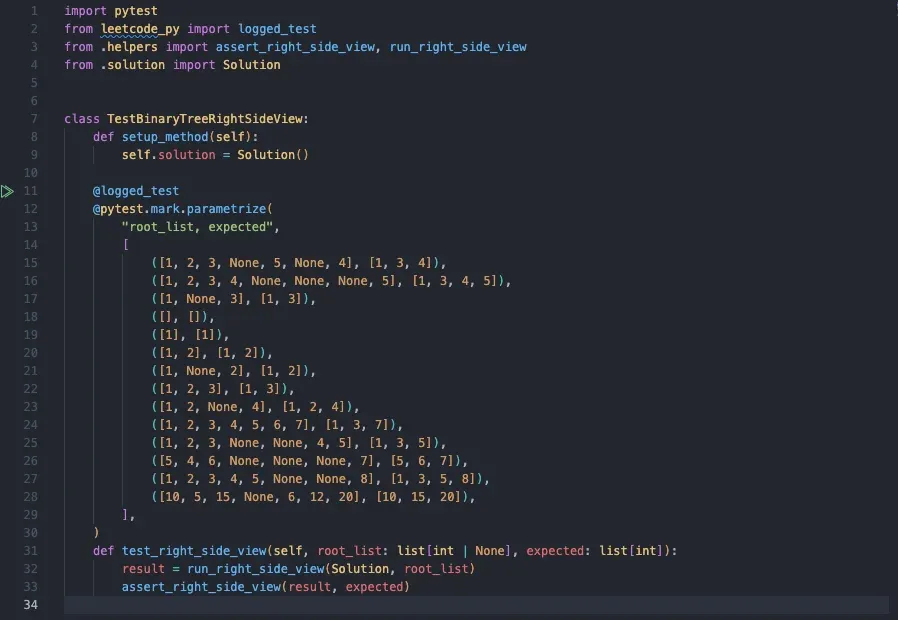
test_solution.py: one parametrize table of inputs and expected outputs, one typed test method.The practice loop is one command:
python -m pytest test_solution.pyFailures name the exact case: the input, the expected value, what came back. You are never decoding a stack trace to figure out which example broke; the suite tells you in the first line. Here a wrong attempt at Two Sum (it reuses the same element twice) is caught immediately by the case [3, 2, 4]:
![pytest output naming the exact failing case: nums = [3, 2, 4], target = 6, with result = [0, 0] against expected = [1, 2]](/_astro/pytest-failure.Dt19SPkf_Z2apHdq.webp)
[3, 2, 4] came back [0, 0] where the suite expected [1, 2].Across the full catalog that is more than 21,000 cases, so the feedback you get locally is not one example repeated.
Helpers speak LeetCode’s language
The annoying part of local practice is translation. LeetCode encodes a linked list as [1,4,3,2,5,2] and hands your function a ListNode chain; trees work the same way. In the web editor that magic is invisible. In the generated helpers.py, it is two functions you call:
from helpers import run_two_sum, assert_two_sum
from solution import Solution

result = run_two_sum(Solution, nums, target)  # builds inputs, calls your code
assert_two_sum(result, expected)  # compares the way LeetCode would
run_* builds the data structures from plain arrays, invokes your solution, and returns the result; assert_* serializes modified lists and trees back and checks element by element. Translation is setup, so the helpers take it: you stay in the problem’s terms the whole time.
See the structure
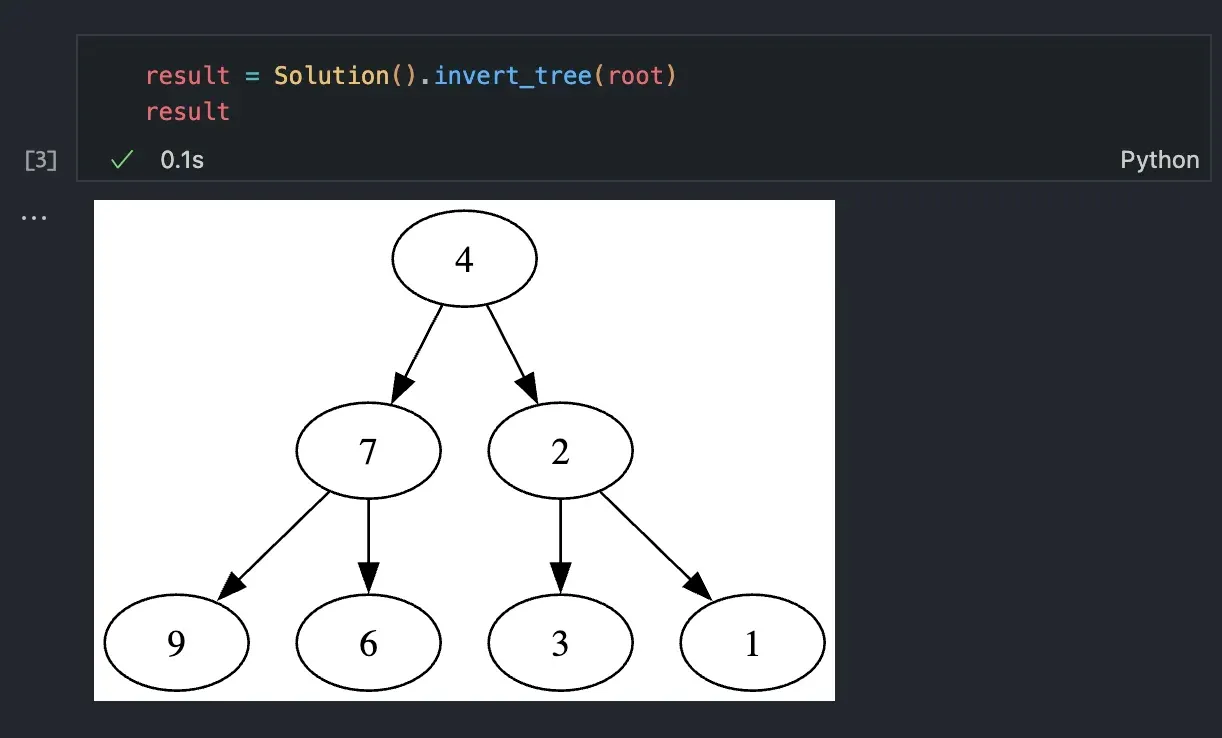
The visualizations are the flashiest feature. TreeNode, ListNode, and GraphNode draw as Graphviz diagrams in a notebook and print as clean ASCII trees in the terminal, so a malformed tree stops being a wall of nested brackets and becomes a picture you can stare at. Decoding brackets is setup; reading structure is practice. It turns “why is my tree wrong” from a debugging session into a glance, and in a debugger it means the watch panel shows structure instead of pointers. Here is an inverted tree, the result of calling the solution and just displaying it in a notebook cell:
A linked list comes back the same way, which makes off-by-one and cycle bugs visible at a glance:

The playground
playground.py is the most underrated file in the directory. It is a tiny notebook pre-loaded with one example: the data structures built, your solution imported, a result variable waiting. When you want to poke at an input rather than assert about it, this is where you go. Change nums, rerun the cell, look at the result drawn as a diagram. Tests teach you whether your answer is right; the playground teaches you how the data structure behaves. It is the closest thing to the web editor’s scratchpad, except the variables are yours.
Study plans are one command away
The famous lists are built in: Blind 75, Grind 75, NeetCode 150 and 250, AlgoMaster 75, among others. The full catalog holds 1,404 problems, each one command away. lcpy list -t blind-75 shows what is in a plan; lcpy gen -t blind-75 renders all 75 environments at once, each a directory you can tick off as you finish it. Your progress is git history.
The judge is still one tab away
One honest limitation, because you would rather hear it from me: generated tests are not the LeetCode judge. LeetCode runs hundreds of hidden cases per problem and enforces time limits; ten parametrized cases certify nothing and time nothing. What they give you is fast, readable feedback while you practice: the exact case that failed, the input, the expected shape. The real judge is one browser tab away whenever you want the official verdict. The tool optimizes for the ninety seconds of iteration between attempts, not for replacing the referee.
Who it is for
If you are happy practicing in the browser, stay there. If you have ever wanted your LeetCode work in the same repo, editor, and debugger as everything else you write, install the package and generate one problem. The whole workflow fits in the time it used to take to copy the examples.
And if you wonder how a catalog this size stays trustworthy, that is its own story, and the one I tell next.